MenuGen
Overview
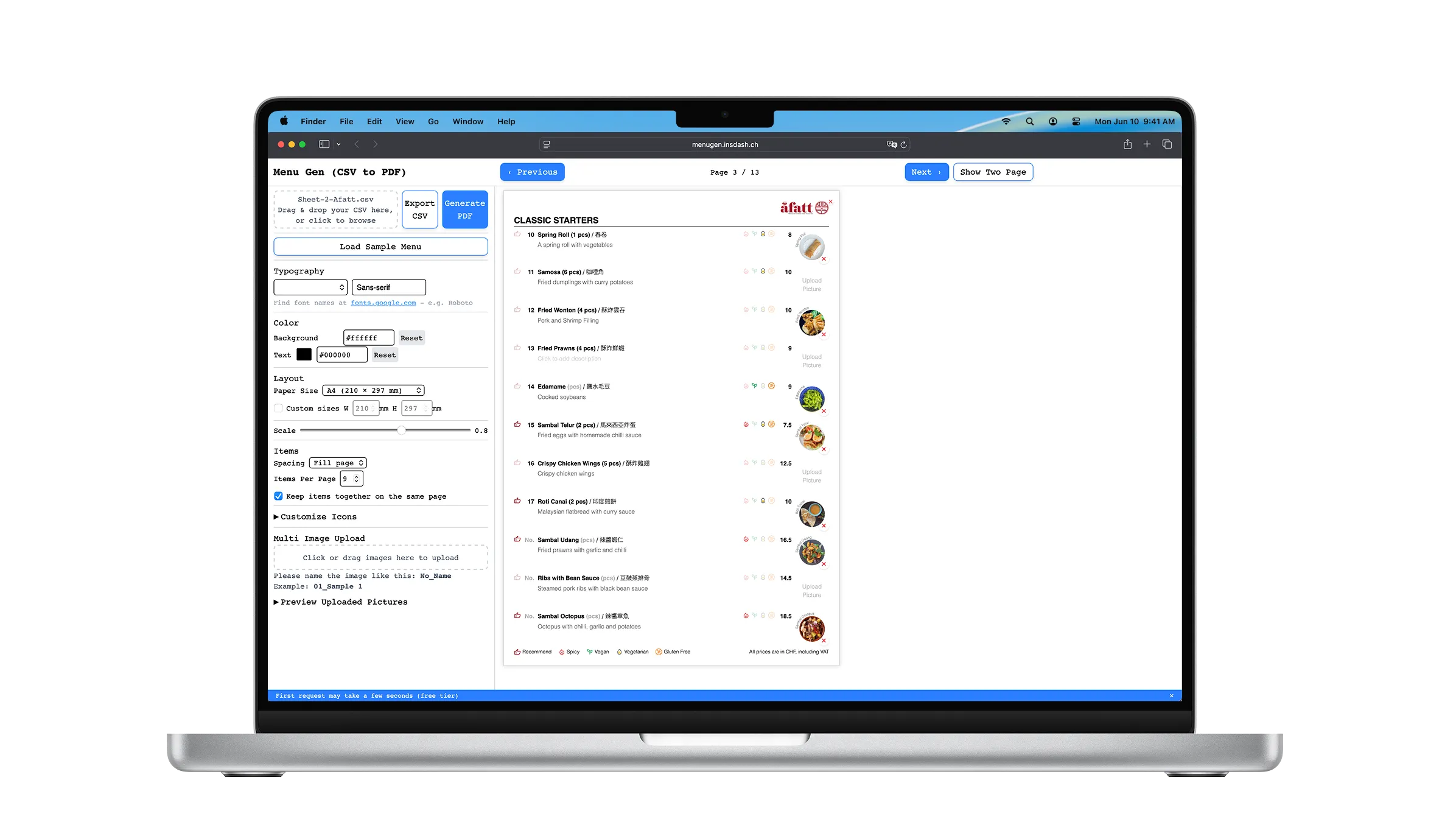
MenuGen is a restaurant menu management platform that enables restaurants to create, update, and maintain professional menus through an interactive web application.
Instead of repeatedly editing design files, users can import structured menu data, edit content visually, preview layouts in real time, and generate print-ready PDFs that closely match the browser preview.
The project separates content management from presentation, allowing restaurants to update menu content while preserving a consistent visual design.
Key Highlights
- Designed and developed a full-stack web application from concept to production.
- Engineered an HTML-to-PDF rendering pipeline in Puppeteer whose output matches the browser preview.
- Built an asset optimization pipeline for images and SVGs with Sharp.
- Implemented asynchronous PDF generation to improve responsiveness.
- Designed a local-first architecture with zero onboarding.
- Containerized and deployed the application using Docker.
The Problem
Restaurant menus are typically maintained in design tools such as Figma or Canva.
Every update requires reopening design files, adjusting layouts manually, and exporting new PDFs—even for simple changes like prices or seasonal dishes.
This workflow becomes difficult to maintain as menus grow or support multiple languages.
The Solution
MenuGen transforms structured menu data into an interactive editing experience.
CSV
↓
Interactive Editor
↓
Live Preview
↓
Print-ready PDF
Instead of editing layouts manually, restaurant staff only manage structured content while MenuGen preserves the visual design automatically.
Project Origin
This project began after I completed the restaurant’s visual menu designs in Figma and Canva.
Although the menu design was complete, every menu update required reopening the original design files, making manual edits, checking layouts, and exporting new PDFs. Even small content changes became repetitive and difficult to maintain.
Rather than continuing to update static designs, I decided to turn the modular menu system into a web application.
The result is MenuGen — a platform that preserves the original visual design while allowing menu content to be managed through structured data and exported as production-ready PDFs.
Architecture Decisions
Goal
Validate the core editing workflow before introducing SaaS complexity.
Design Principles
- Local-first editing
- No account required
- No database
- Minimal onboarding
- Fast workflow
Why this approach?
Menu data remains inside the user’s browser and is only sent to the backend when generating a PDF.
This keeps the infrastructure simple while allowing users to start immediately.
I intentionally avoided authentication and persistent storage because they were not required to validate the core workflow. This reduced implementation complexity while leaving room for future expansion.
Trade-offs
Benefits
- Better privacy
- Zero onboarding
- Faster iteration
- Simple deployment
Limitations
- No persistent storage
- No collaboration
- No version history
Engineering Highlights
- Built an HTML-to-PDF rendering pipeline using Puppeteer to ensure exported documents match the browser preview.
- Designed an asset processing pipeline using Sharp to optimize images and SVGs before server-side rendering.
- Implemented asynchronous PDF generation to improve responsiveness and prepare the architecture for future scaling.
- Designed a CSV-driven workflow that separates structured menu data from presentation.
- Adopted a local-first architecture to validate the core editing workflow with minimal onboarding.
- Containerized the application with Docker and deployed it to production.
System Architecture
The architecture separates user interaction, asset processing, and document rendering to keep the editing experience responsive while handling resource-intensive PDF generation.
                USER
                 |
                 v
        Vue 3 Frontend + Pinia State
                 |
        ------------------
        |                |
        v                v
 Interactive Editor     Live Preview
        |
        |
        v
     Menu Data Model (CSV / JSON)
                 |
                 v
          Express API
                 |
        ------------------
        |                |
        v                v
 Asset Pipeline       PDF Renderer
    Sharp             Puppeteer
        |                |
        ------------------
                 |
                 v
          Print-ready PDF
Frontend
Responsible for editing structured menu data and rendering the live preview.
Backend
Handles PDF generation and asset preprocessing.
Rendering Pipeline
Processes images, embeds assets, and generates print-ready PDFs that match the preview.
PDF Rendering Pipeline
User HTML
↓
Asset Scanning
↓
Image Optimization (Sharp)
↓
SVG Processing
↓
Base64 Inlining
↓
Puppeteer Rendering
↓
Print-ready PDF
Engineering Challenges
Pixel-perfect PDF Rendering
| Challenge | Approach | Outcome |
|---|---|---|
| Browser preview and PDF output rendered differently. | Built a Puppeteer pipeline with controlled asset handling. | Exported PDFs consistently match the browser preview. |
Reliable Asset Loading
| Challenge | Approach | Outcome |
|---|---|---|
| Browser-side assets were unreliable during server rendering. | Preprocessed images and embedded assets before PDF generation. | Generated PDFs without missing assets or broken references. |
Performance Optimization
| Challenge | Approach | Outcome |
|---|---|---|
| Large images increased PDF generation time and output size. | Built a Sharp-based optimization pipeline for images and SVGs. | Faster rendering while maintaining print quality. |
Production Deployment
Frontend
- Vue
- Vercel
Backend
- Express
- Render
Containerization
- Docker
- Docker Compose
Document Generation
- Puppeteer
- Sharp

Interactive Demo - See It In Action
Inline Edit

Edit Items

Upload Multi Pictures

Customize Icons

View in Single and Two Page
Future Improvements
The current version focuses on validating the core editing workflow through a privacy-first architecture.
The next stage of MenuGen is transforming it from a session-based editing tool into a collaborative SaaS platform.
- User authentication
- Persistent menu storage
- Cloud object storage
- Restaurant workspaces
- Version history
- AI-assisted menu translation and description generation
These additions build upon the existing document generation pipeline without changing the core editing experience.
Engineering Takeaways
Building MenuGen reinforced several engineering principles.
- Product requirements often drive architectural decisions more than technology choices.
- Separating content from presentation improves maintainability.
- Reliable document generation requires controlled asset handling.
- Building the simplest architecture that solves today’s problem often creates a better foundation than over-engineering for hypothetical future requirements.
What This Project Demonstrates
- Identifying and solving a real product workflow problem
- End-to-end full-stack product development
- Translating a modular design into maintainable software
- Making architectural decisions based on product requirements
- Deploying and operating production applications
GitHub Repository
