MenuGen
Overview
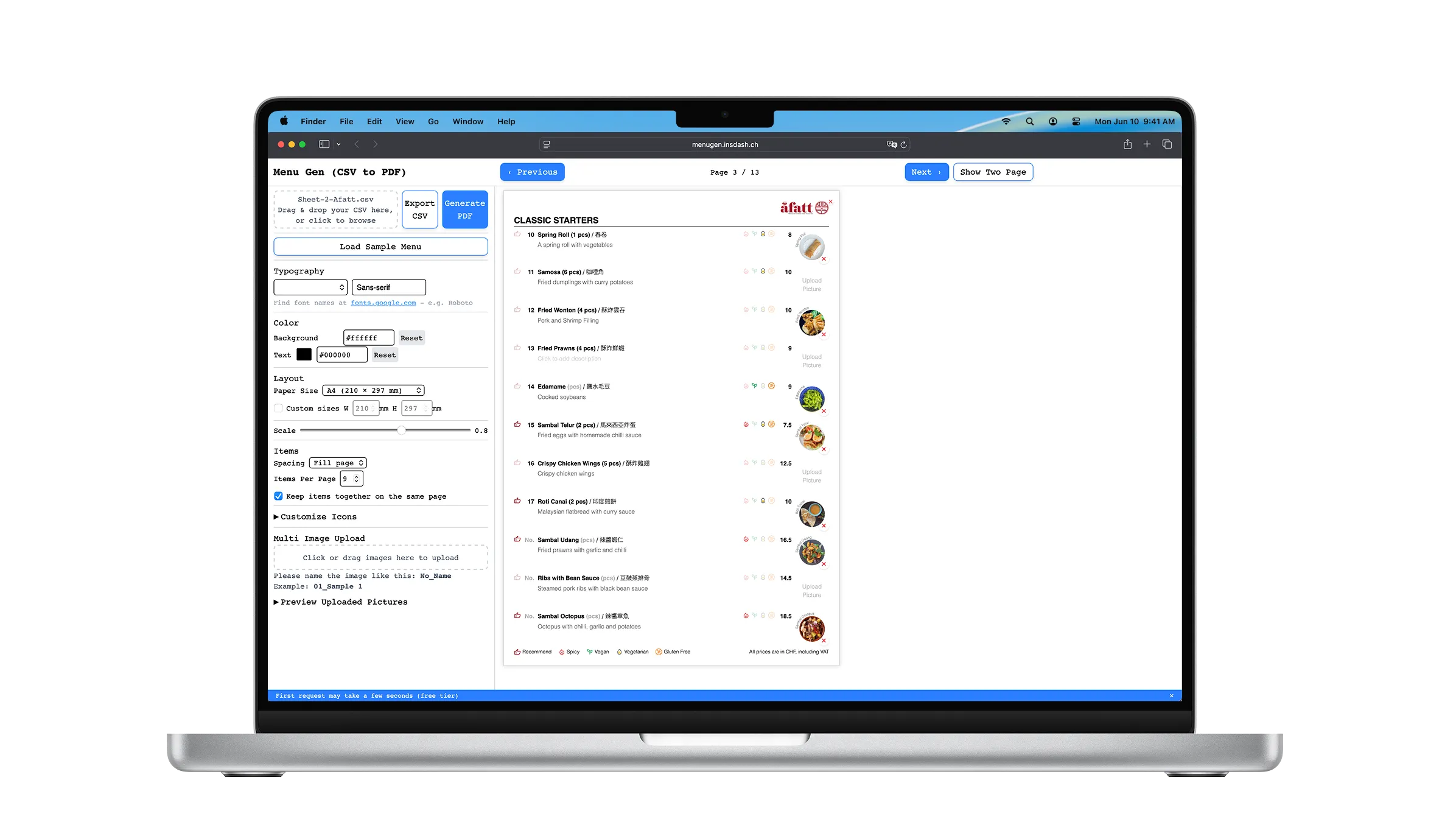
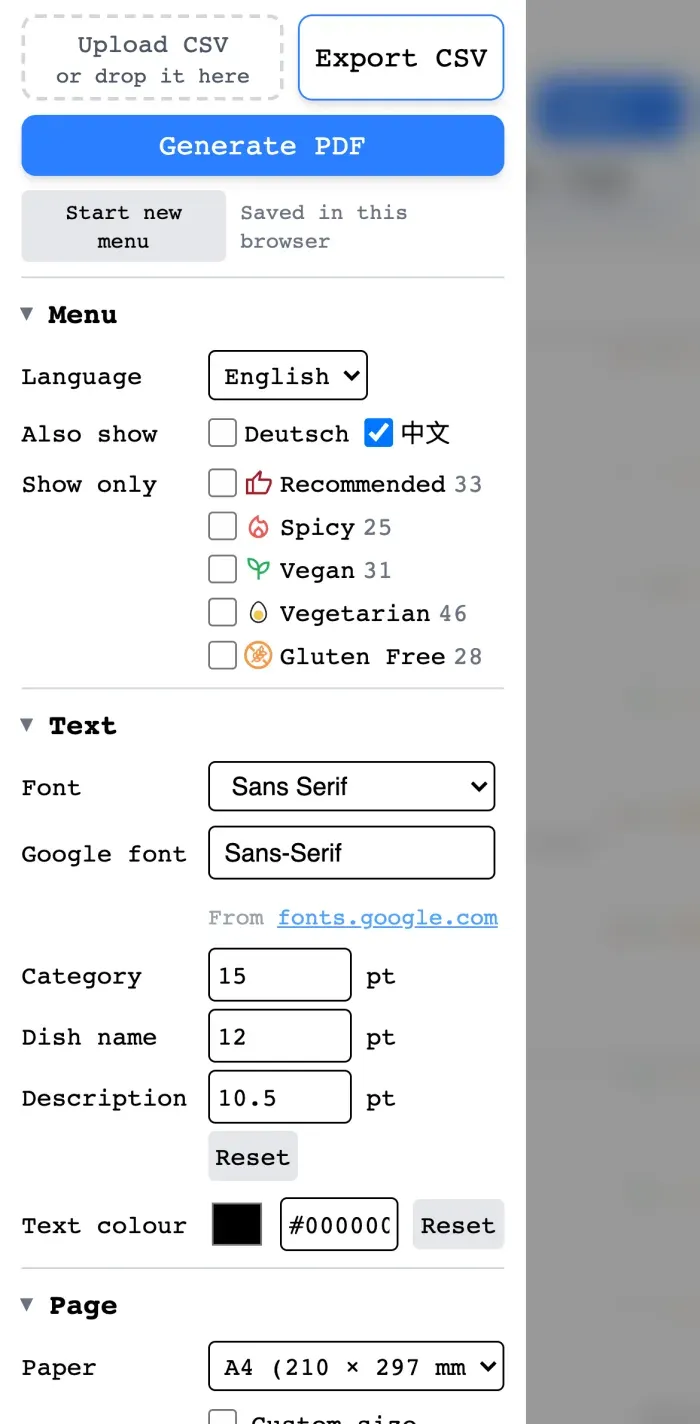
MenuGen turns a spreadsheet into a print-ready restaurant menu. The editor’s live preview is not a picture of the document — it is the document, and the PDF is printed from the same markup.
I built it because I had already done the job by hand. In 2024 I designed a modular menu system for A Fatt, a Malaysian Chinese restaurant in Zürich — around 90 dishes across 20 sections, each with a name, a Chinese name, a price, a description, dietary tags and a photo. It worked, and the restaurant still uses it. But every change that came back to me went through Figma and Canva, where editing text means editing a layout: a two-word description lands a dish on the next page, and the next page has to be checked too. I was making the same edit by hand, again and again.
The design was finished; the maintenance was not, and it would outlive the design by years. MenuGen is that problem solved for the general case — built afterwards, on my own, with A Fatt’s menu as the fixture. The tool they did take is MenuDash.
Key Highlights
- The spreadsheet is the schema. Fixed columns describe a dish in each language; every other column becomes a dietary tag with an icon you assign. A restaurant adds “Halal” by typing a header in Excel, not by waiting for a release, and the file can be a CSV, an Excel workbook or a Numbers one.
- The preview was lying to me, and the lie lived on my laptop. Chinese dish names rendered in the browser and disappeared from the PDF, because my Mac had CJK fonts installed and a slim render container has none.
- The phone is a camera, not a small screen. Dish photographs are taken in the restaurant, on a phone, by whoever cooked it — so capture, crop and placement all have to work under a thumb.
- A real menu crashed the server, so I cut what it costs to run. A 76-photo menu took the 512 MB instance to 474 MB and it was killed. I traced 68 MB to one line, rewrote the export to keep the page as a string, and the same menu now peaks at 365 MB with a pixel-identical PDF. One browser, one queue, on a free instance, sized on purpose.
The Problem
Design files put content and layout in the same place, so the cost is never in the edit — it is in checking every page after it. And it multiplies for a bilingual menu, where the same change has to land in the German file and the English one with nothing but attention keeping them in step. The work is never hard, which is exactly why it drifts back to the designer months after a project has closed.
The tools that already do this do it for a different operator. InDesign’s data merge has been pouring spreadsheets into layouts for twenty years, and Canva’s bulk features get close — but both put the layout file back in front of whoever runs them, so either the restaurant learns a design tool or the designer stays in the loop permanently. That loop was the thing to remove, not relocate. MenuGen’s bet is that if the layout is code, nobody has to open it.
The Solution
Content in a spreadsheet, layout in code, and one button between them.
CSV, Excel or Numbers
↓
Interactive Editor
↓
Live Preview
↓
Print-ready PDF
The Preview Is the Document
The obvious way to build this is to write the layout twice — once in Vue for the screen, once in a template for the PDF — and then spend the rest of the project keeping them equal. I did not want that job, so the export sends the preview’s own innerHTML to the server, and the server’s work is to take the interface back out of it.
Every field is editable in place, and the thing being edited is the thing that prints.
Three passes, over the markup the browser sent, kept as a string: each pass splices where an HTML parser reports a tag, and no document tree is ever built on the server (why that matters is below).
- Sanitize. Every
<input>,<textarea>and<select>is replaced by a<span>holding its value. The editable menu becomes a printed one without a second stylesheet, because the text was always the text — the input was just wearing it. - Inline. Every image becomes a base64 data URI, resized through Sharp to the size it prints at, and SVG icons are rasterised to 96px PNG. Nothing in the printed page has to fetch anything.
- Hide. Anything marked
data-ui-onlyis set todisplay: none— delete buttons, drop zones, the “click to add description” placeholders that exist to invite an edit rather than to be printed.
Only then is the document wrapped in a head carrying the compiled Tailwind stylesheet, read straight off disk so the print and the screen share one source of truth for spacing.
That last point is the whole argument. Rendering fidelity here is not the achievement of a rendering pipeline; it is a consequence of never having built a second layout to be unfaithful to.
The Spreadsheet Is the Schema
The import is the product decision I am most pleased with, and it is almost entirely a decision about columns.
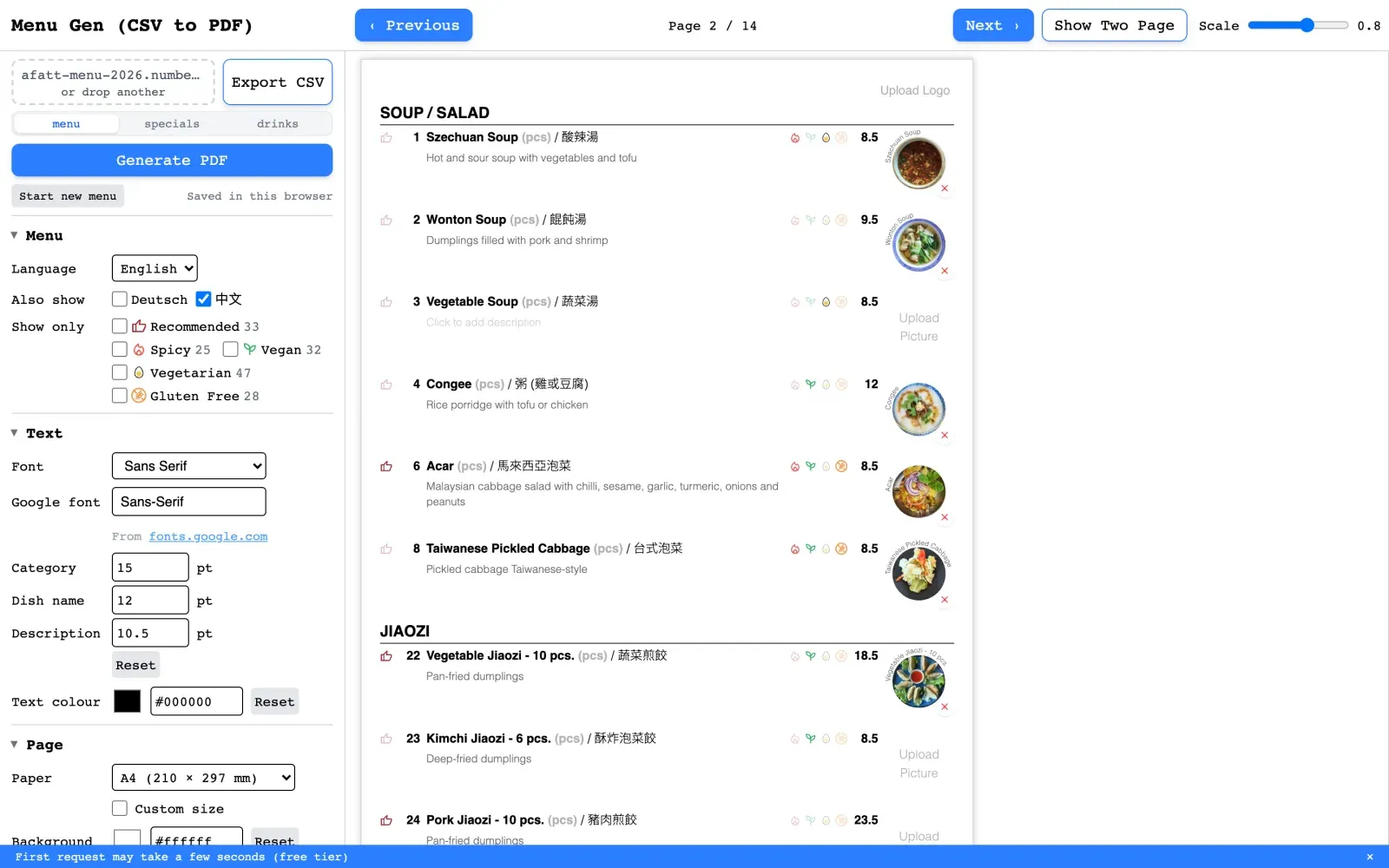
A few of them describe a dish: No., Price and Measure, then a name and a description per language (Name (EN), Name (DE), Name (ZH) and so on). Five more are the preset diets. Every other column in the file is treated as a tag — registered at upload with a placeholder icon you then assign and colour. A Fatt’s menu arrives with Recommend, Spicy, Vegan, Vegetarian and Gluten Free; a restaurant that needs Halal or a chef’s pick adds a column in Excel and it appears, no deploy and no conversation with me.
Two smaller rules do a similar amount of work. A row with a name but no number and no price is a section heading, not a dish — so SOUP / SALAD sits in the sheet exactly where it sits on the menu, and the spreadsheet stays readable as a spreadsheet. And photographs are matched to dishes by filename: drop forty images at once and each one finds its item as Name, 01_Name or 1_Name, compressed to 600px in the browser before it ever reaches application state.
The export goes back the other way, as a CSV with an X in each tag column the dish carries — so the file that came out of a restaurant’s spreadsheet can go back into it.
That matching used to fail in silence. A photograph whose filename matched nothing was discarded where it was compressed — and because the list of uploaded files is computed from the dishes themselves, it then appeared in neither the menu nor the list of what you had just uploaded. Forty photos went in, thirty-eight landed, and the interface said the same thing either way. It now names what it could not place — 3 of 5 files were not added, each filename and its reason — directly above the line that explains the naming rule which fixes it. A batch operation that reports only its successes leaves you to audit it by hand, which was the work the batch existed to remove.
One Sheet, Every Menu
Going back to A Fatt for paid work in September 2026, I was asked for a third menu: a vegan and vegetarian one, next to their English and German menus, each of which carries Chinese. Three menus mean one price change is three edits, and sooner or later one gets missed. Releases 1.1 to 1.4 are built for that.
- A dish holds its name, description and category per language, and its diets as fields. A main language plus Also show sets the line (
Szechuan Suppe / Szechuan Soup / 酸辣湯), and Show only prints the vegetarian or vegan menu from the same rows, with vegan counted as vegetarian. - The preview, the page count and the PDF use the filtered dishes, while editing, CSV export and photo matching still see the whole menu. A price is typed once and reaches every language and every diet version.
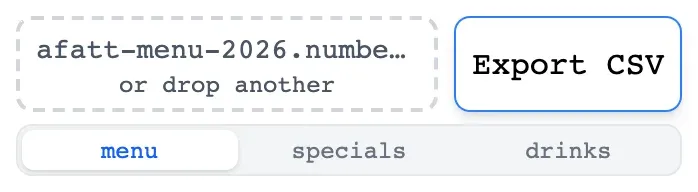
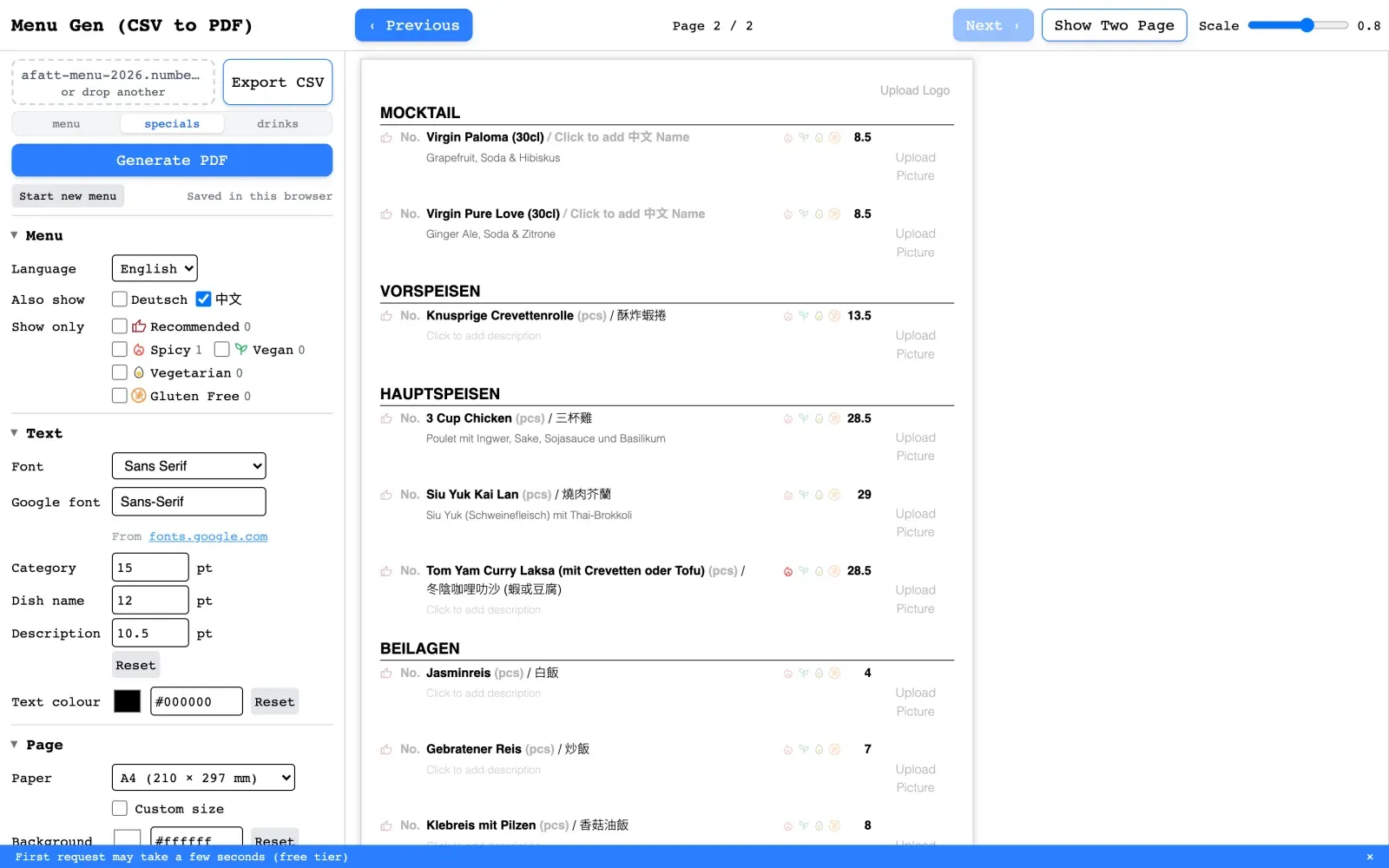
- One workbook, every sheet (1.5). The file doesn’t have to be exported first: an Excel or Numbers workbook opens as it is, with a tab per sheet, and Generate PDF prints whichever sheet is open. A Fatt’s workbook keeps the menu, the specials and the drinks side by side, and each is a tab. Each sheet is turned into CSV text in the browser and goes through the same parser, so there is still one set of rules, and the file never leaves the device. The reader is only downloaded when a workbook is dropped, and the file’s signature is checked first, because the library reads anything it doesn’t recognise as a one-cell sheet rather than refusing it.
- The draft survives a reload. It saves to the browser a second after each change and at once when the tab is hidden, times out a stalled read rather than saving over it, and trusts nothing it reads back. Work in progress stays on the device, and the backend still holds no user data.
The course that didn’t print
Testing on their real menu found the worst kind of bug. The preview paginated properly, keeping categories together, but the page counter and the PDF worked the count out by dividing dishes by page size. A page that keeps a category together holds fewer dishes than that, so the PDF ended a page early and the last category never printed. It was A Fatt’s desserts, the section I had just been paid to add. Pagination is now one function that the preview, the counter and the PDF all call, under seven tests, one of which pins exactly this. It was the one-layout rule, applied to the one place it hadn’t reached.
A Fatt still don’t use menuGen. Their menu is what I test it against.
The Phone Is the Camera
A dish photograph is taken in the restaurant, on a phone, usually by whoever cooked it. Every decision about images follows from that being the shortest path between the dish and the menu.
The upload inputs are accept="image/*" and deliberately carry no capture attribute. On a phone that opens the native sheet — Take Photo, Photo Library, Choose File — so the picture taken thirty seconds ago and the one taken last week arrive by the same door. Adding capture would have forced the camera and broken the more common of the two.
What comes back from a phone camera is four thousand pixels of plate for a slot two centimetres wide, so the cropper is the product rather than a nicety — at 903 lines it is the largest component in the app. Touch is a first input rather than a mouse fallback: coordinates are normalised across MouseEvent and TouchEvent, and drag and resize both bind touchmove with { passive: false }, so pulling one of the eight handles moves it instead of scrolling the page out from under you. That last detail is the difference between a cropper and a cropper you can use.
The crop runs on the client through a canvas: the frame’s on-screen coordinates are mapped back through the letterboxing offsets into the source image’s natural coordinates, and the region is drawn out as a data URI, so nothing round-trips to a server to find out what a photograph will look like.
The output canvas used to be sized to the frame as it appeared on screen — 240px square for a dish — so a crop downsampled to display size and threw away the rest of the selection. Beside a dish name that held; a cover printed two and a half inches wide came out at about 96 pixels per inch. A crop now keeps the source’s own pixels inside the selection, up to what its slot needs to print at 300 ppi, and stops there.
The Fonts Were Lying to Me
Fonts took eleven commits across two days in March, and produced the only bug in this project that I would call embarrassing.
You choose the menu’s typeface by typing a Google Fonts name. Pick a display serif and the Latin text is exactly what you asked for — but it has no Chinese glyphs, so 酸辣湯 falls through to whatever the renderer has installed. On my Mac that is a perfectly good system CJK font, and the preview looked right. Inside a slim Linux container there is nothing to fall through to.
The preview was correct for a reason that only existed on my machine. That is worse than a preview that is visibly wrong, because there is nothing to notice.
The fix is to stop leaving the fallback to chance and pin it on both sides of the wall: '<chosen font>', 'Noto Sans TC', sans-serif, written into the PDF’s head and into the preview component’s computed style, with Noto Sans TC linked in the app’s own index.html too. The server also parses the first family out of the CSS stack and checks it against a list of system fonts, so it never asks Google Fonts for a file called sans-serif.
An earlier version had solved this by committing nine Noto Sans TC weights into the repository — 64 MB of font in a Git history to render Chinese text. Deleting them for a stylesheet link is the version that survived, backed at the OS layer: the Docker image installs fonts-noto-cjk and the WenQuanYi families, so a page that never reaches the network still has glyphs.
Every wait needs a ceiling
The second half was when to print. networkidle0 waits for the network to go quiet, which a document full of inlined base64 makes slow and fragile; domcontentloaded does not wait for a webfont at all, so the PDF prints in the fallback and looks like a bug in the layout.
So the document loads at load, under a 20-second budget of its own inside the page’s 60, and a stylesheet that times out is caught rather than thrown: by then the markup is in place, so a slow CDN costs the webfont and not the export. After that, document.fonts.ready is raced against five seconds, and every image is awaited on onload/onerror with a three-second cap. Every wait has a ceiling. A font CDN having a bad afternoon costs a restaurant its chosen typeface, not its menu.
The same bug, one character narrower
The first real menu found the font problem again. 叄, in 叄峇 (sambal, on five of A Fatt’s dishes), is not in Noto Sans TC. The preview borrowed it from my Mac, and the PDF printed a box. The March fix had pinned a font; it had not checked that the font covered the menu. Noto Sans SC now sits behind TC in the same request, and Chrome fetches only the slice a character needs.
One Browser on a Free Instance
Puppeteer launches a Chromium per render. Two people exporting at the same moment on a small free instance is two Chromiums, and the answer to that is not a bigger timeout.
So the export is a job, not a request. POST /generate-pdf returns a jobId immediately, a single processing flag keeps exactly one render in flight, the browser polls /job/:id, and finished jobs are swept on a five-minute TTL. The renderer logs RSS either side of each PDF, which is how I knew where the ceiling was rather than where I assumed it was.
Being exact: it is a queue in an array in one process. Jobs do not survive a restart, and none of it survives a second instance. For one worker and a single-digit number of concurrent users that is the honest size of the problem — naming it as scaling groundwork would be overselling a while loop.
Running in two places produced one more lesson. The Docker image installs Chromium at /usr/bin/chromium, so that path was hardcoded — and on Render’s native runtime there was nothing there. It became process.env.CHROMIUM_PATH || null. A default that is correct in one environment is a bug in the other. Production now runs the Docker image on Render, which also gives the live service its own Chinese fonts. The move found one more silent failure first: the image had been built without the compiled stylesheet the renderer reads, so every live PDF would have exported unstyled, with no error. CI now checks that the image holds the stylesheet and a Chinese font.
The box was smaller than my laptop
The instance has 512 MB, and the product had only ever run on a laptop where that ceiling doesn’t exist. A real 76-photo menu took the container to 474 MB and it was killed. Because the renderer logs memory either side of every PDF, I could find where it went instead of guessing: 68 MB of it was one line, new JSDOM(...), building a whole document tree on the server to make three small edits, then throwing it away so Chrome could parse the same markup again.
So I took the tree out. The export now rewrites the page as a string, splicing at the positions an HTML parser reports for each tag, and hands back the very same string when there is nothing to change. jsdom left the dependencies. The same menu peaks at 365 MB for the whole container, nearly a quarter less, and the PDF is identical to the pixel, checked on that menu and on a page that exercises every edit. The same bytes cost about 1× as a string and 30× as a document tree, and Chrome parses the page regardless.
The rest of the resource work follows the same rule, which is not to pay for anything the user isn’t using:
- Photos are sized before they travel. A cut-out dish with a transparent background is encoded as WebP, 41 KB against 445 KB as PNG; opaque photos stay JPEG.
- The spreadsheet reader loads only when a spreadsheet arrives. It is a separate chunk, so a visitor who drops a CSV never downloads it.
- What I haven’t fixed, I’ve measured. A menu whose photos arrive uncompressed still peaks near 490 MB, because that peak is set while resizing them, before any of this runs. That is the next ceiling, and I know where it is.
Sized for the page, not the file
Every photo used to leave for the PDF at 300 pixels, whatever it printed at — more than a dish under an inch wide needs, and a third of what a cover two and a half inches wide does. The size a photo needs is a fact about the page: at export the editor writes each image’s printed size on it, the server resizes it to exactly that for 300 ppi, and a 12-million-pixel ceiling on the whole menu makes the largest menus print slightly softer rather than fail.
Two measurements were wrong before it worked, and both passed. A test menu of one photo repeated 76 times looked comfortable, while A Fatt’s 76 real photos, in a container capped like the instance, reached the 512 MB limit: Chromium decodes a repeated image once, and the budget I shipped first had to be halved. Then the sizing shipped and did nothing. The PDF is built from a copy of the menu in a display: none box, where every image measures zero, and the unit tests had supplied the sizes a browser never would. Exporting A Fatt’s menu through the live editor caught both. On their menu the result isn’t sharper — their photos were already above 300 ppi — it is the same print from about 40% fewer pixels. The visible gain is in covers and large photos.
The sixty seconds I did not fix
A free instance sleeps, and waking it takes up to a minute. I had two options — pay for a warm instance, or tell the truth — and for a portfolio deployment the second is the better product decision anyway.
So the export overlay says so: the first export may take up to 60 seconds while the server starts. A dismissible banner repeats it before anyone presses the button. And a failure shows an in-page state with a Retry Export PDF button and the reassurance that the work is still there.
The queue has words of its own too (1.4.2). While someone else’s PDF is rendering, yours says it is waiting in line and will start automatically, instead of spinning, and a full queue and the rate limit each say which one happened, rather than a generic failure. An export of the untouched sample asks first, so the sample isn’t printed by mistake.
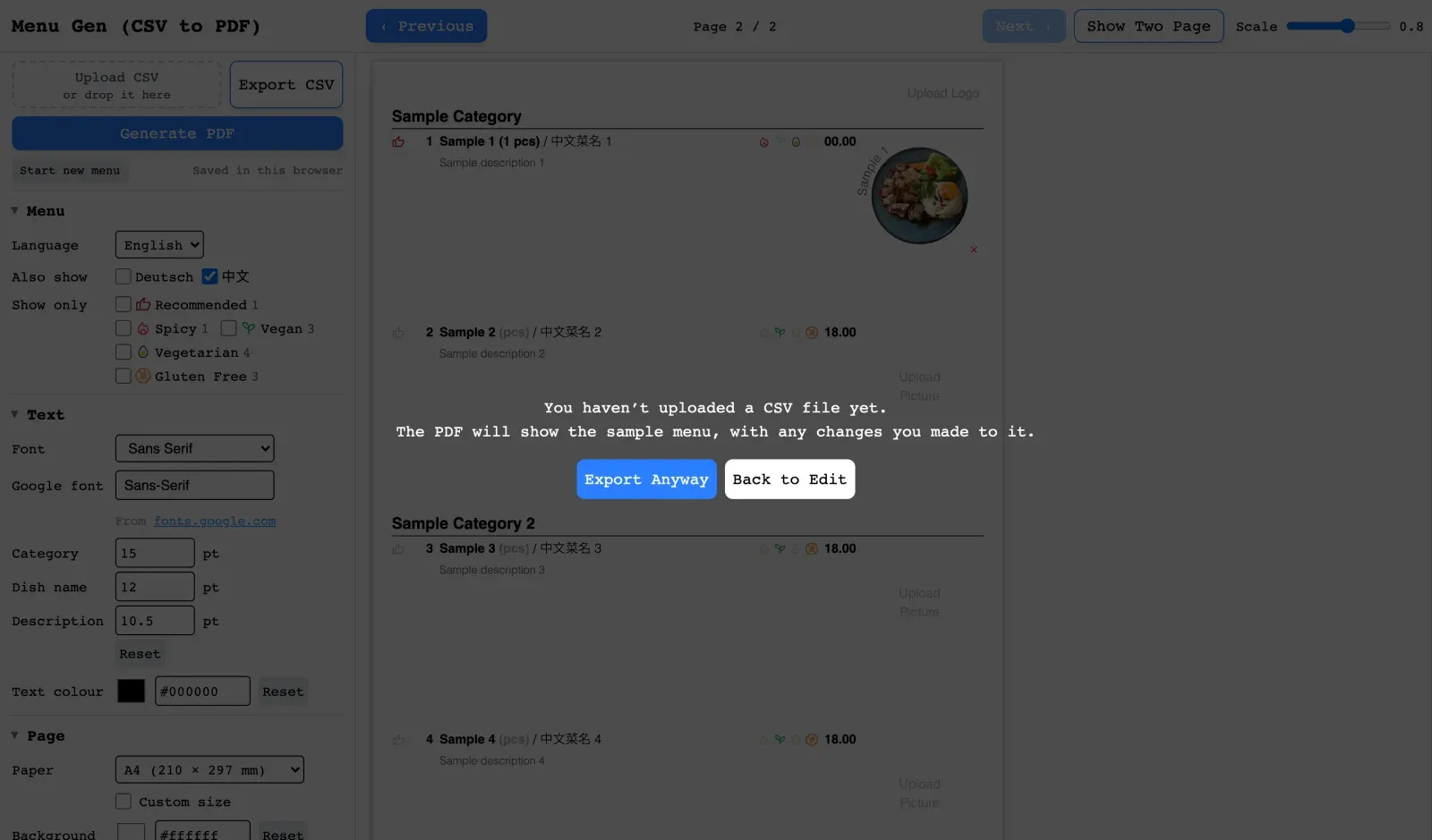
An export that can fail at fifty-five seconds and offers one click to try again is a different product from one that fails at fifty-five seconds and says so in a dialog. The rendering code is identical in both.
The Export That Did Nothing on a Phone
The bug I would not have found on the machine I built it on — and it arrived in the commit meant to let me test on another one. It also landed on the surface this product can least afford: the phone is where the photographs come from.
The export ended in one anchor: create it, give it the blob URL, append, click, remove. The mobile branch was inserted into the middle of that, and it built a second anchor inside a FileReader callback — const a again, shadowing the first — gave it a data URL and a download filename, then let it fall out of scope. Nothing ever clicked it. The one that did get clicked was the outer anchor: a blob URL with no download attribute, which is exactly what iOS Safari will neither display nor save.
So the button spun for its full minute, the overlay cleared, and nothing happened. No error, no console message, nothing to report beyond “it doesn’t work” — the PDF had been generated correctly and dropped in the last five lines.
It shipped in the pass that made the editor responsive and put the dev server on the local network for cross-device testing, which is the joke I have to live with: the change that let me open the app on a phone is the change that stopped the phone from getting a file.
The fix is smaller than the bug. Detect iOS honestly — an iPad reports itself as MacIntel and gives itself away by its touch points rather than its user agent — then simply navigate, window.location.href = url, because Safari will not honour a programmatic download anyway. Everywhere else keeps the anchor and the new tab, with URL.revokeObjectURL on a ten-second timer so a long session stops accumulating blobs.
What I took from it is not about Safari. Two anchors named a in one function is what a reviewer catches and a solo project does not — and the deeper miss is that the success path carried no assertion. Every failure was handled and reported; the one that reported success and produced no file was the one nothing was watching.
No Accounts, No Database
Menu data lives in the browser and leaves it only to be printed. There is no sign-up, no server-side storage, no user table.
That reads as a privacy feature, and it is one, but it was a scope decision first. The question the project existed to answer was whether managing a menu as structured content beats managing it as a design file, and neither auth nor storage helps answer it. They are the cost of the next question, and paying it early would have bought a slower answer to this one.
What it buys
- Someone can try it in the time it takes to drag a file onto the page.
- No account, no data retained, nothing to breach.
- One frontend, one stateless backend, no migrations to reason about.
What it costs
- The work lives on one device. The draft saves itself to the browser (IndexedDB) a second after each change, so a reload keeps it, but nothing follows you to another machine.
- No collaboration, no history, no reopening last season’s menu.
- The CSV export is the only way to move a menu between devices, which is fine for a designer and thin for a restaurant.
If MenuGen went further, the first thing added would be server storage, and every trade-off above would invert.
System Architecture
There is one reason this has a backend at all: a print-faithful render needs a real browser to drive, and Chromium does not run inside a browser tab. Parsing, editing, layout and the live preview all happen on the client and never leave it. The split falls where it does because the server’s whole job is the part that needs a machine.
                USER
                 |
                 v
        Vue 3 Frontend + Pinia State
                 |
        ------------------
        |                |
        v                v
 Interactive Editor     Live Preview
        |
        |
        v
     Menu Data Model (CSV / JSON)
                 |
                 v
          Express API
                 |
        ------------------
        |                |
        v                v
 Asset Pipeline       PDF Renderer
    Sharp             Puppeteer
        |                |
        ------------------
                 |
                 v
          Print-ready PDF
Vue 3 and TypeScript with Pinia on Vercel; Express on Render, running the same Docker image used locally. Both halves are stateless, which is what makes the queue’s one real cost so small: a restart loses a job in flight and nothing else.
The User I Built For Was Me
A Fatt has the menu MenuGen was built from, and A Fatt does not use MenuGen. A price change goes through the Canva system I delivered in 2024; a new layout still comes back to me. That is the outcome, and it is worth more to me than the demo.
It is not a gap in the features. MenuGen asks you to keep your menu as a spreadsheet, to name a photograph 10_Spring Roll so it finds its dish, and to know that “Playfair Display” is a thing you can type into a box. Each of those is free if you already work in files and structured data, and each is a wall if you do not. For anything that changes the menu, the owner’s workflow is to ask a person — and asking a person is not a workaround for missing software. It is a preference the software has to beat.
So the spreadsheet-as-schema decision cuts both ways, and I would rather say so than keep it as the clever part. It is the right model for maintaining a menu and the wrong front door for starting one, because it assumes a user who already has their menu as data. That describes a designer, an operations manager at a group with several sites, a younger owner already running the business out of a phone and a spreadsheet. It does not describe every restaurant, and it did not describe this one.
The finding was available in week two. I could have handed the owner a price change and watched what they did with it; instead I spent four months building, and learned the same thing by noticing which tool they kept opening.
What I can defend: the tool works, and its segment is narrower than “restaurants”. What I cannot defend yet: that the narrower segment adopts it. The next move is not a feature — it is making the first dish typeable, and keeping CSV as the way data leaves and returns rather than the way it has to arrive. 1.5 took the smaller half of that: a menu can now arrive as the workbook the restaurant already has, not an export of it. The first dish still can’t be typed.
What the no taught me
A restaurant owner judges a menu by what the guest sees. MenuGen made the work behind the menu easier, but the guest still got the same printed page, so there was nothing to switch for.
Before 2026, the restaurant kept its menu in the Canva and PDF files: to check a price or a dish, you opened the file. When they came back to me that year, they asked for a third menu, of only their vegan and vegetarian dishes, next to the English and German ones. That would have meant keeping every price by hand across three PDFs, which guests open from a QR code on phone screens they don’t fit. So instead of handing each guest the English, the German or the vegan and vegetarian menu, I proposed putting all of it on the website they already had, on the workflow I had built MenuGen on for myself: keep every dish in one spreadsheet, and let that sheet drive what the guest sees as well as what gets printed. On their website, that means one online menu that every guest filters by language and diet on their own phone. That became MenuDash. They paid for it, and it has run their menu page since September 2026.
It’s the same spreadsheet I called a wall above, and the difference is who starts it. I set the sheet up with their menu, so the owner never has to start one, only maintain it, which is the half a spreadsheet is good at. They upload it in the WordPress dashboard they already log into, and a wrong file is refused instead of breaking the page. It has been weeks, so whether they keep doing it without me is still open.
The spreadsheet is now where the menu lives: every dish, its translations and its price in one place. A dish is one row, with a field per language and a mark per diet. The owner changes a price once and uploads the sheet, and the website is current. When the print menu needs updating, I run the same file through MenuGen and hand over the PDF.
Where It Stands
MenuGen is live at menugen.insdash.ch. It opens on four placeholder rows rather than a finished menu, so the first thing a visitor can do is edit one instead of clearing ninety. The menu it was built and tested against is A Fatt’s, and in September 2026 their current menu, over a hundred dishes in three languages, found two silent drops the sample never had: the dessert course missing from the PDF, and 叄 printing as a box. It is a working product tested against real data — one restaurant’s. That is what makes its edge cases real, and what leaves me unable to name the ones it has not met.
What I Took From It
- Two representations of one thing will drift, so keep one. Preview fidelity was never a rendering problem — it was the decision not to write the layout twice, and every claim downstream rests on that rather than on Puppeteer.
- A preview that is right by accident is worse than one that is wrong. The Chinese glyphs were correct on the only machine that could not report the problem. Fallbacks that matter get written down, not inherited from whatever the developer’s OS happens to have.
- Waits need ceilings, and success paths need assertions. A font stall, a download that never fired, and an image that decoded to nothing and left the spinner running forever — each one was the code waiting for something to be true with no plan for it not being. That last was a missing
img.onerrorbeside a handledreader.onerror: the failure I had thought of, and the one I had not, four lines apart. It surfaced while I was writing tests for a different bug, which is most of the argument for writing them. - A data model is a claim about who the user is. Making the spreadsheet the schema was the best decision in the build and the one that decided who could use it. Elegance in the model came out as a prerequisite in the user, and I did not see it until I noticed who was still opening Canva.
- Coverage is not correctness. My first test suite exercised a CSV parser nothing called, while the parser the product actually runs went untested. I deleted the dead one and moved its assertions onto the live path, including the quoted comma the naive version would have split in half. This year a synthetic menu and a unit test that supplied its own sizes both passed; an export of the real menu through the live editor did not.
Where I Stopped
Authentication, stored menus and multi-restaurant workspaces are all scoped and none of them are built, because none of them were needed to find out whether the core idea worked. Translation is the one I want to build — each dish now carries its name, description and category in English, German and Chinese, so the gap is filling those fields, not storing them. It is not the one I would build next. Next is the empty state, because the finding above is that the tool loses people before it ever gets the chance to be useful.
What I would not build is a design tool. MenuGen wins by refusing to be one — the layout is code precisely so that nobody has to open it — and every feature that lets a user nudge the layout takes back the thing the project was for.
GitHub Repository
